
The demo project
Policy Builder comes with a demo: Nginx Web Server Demo, a complete project that turns a host into an nginx web server and hardens it. It shows the parts of Policy Builder described in this section working together: several configurations, variables shared between them, arrows that react to changes, groups, templates and a module. The demo isn’t saved anywhere until you choose to, so change whatever you like.
Opening the demo
On the start screen, click Try Demo: Nginx Web Server under or explore, or choose File, then Try Demo: Nginx Web Server. It opens on Webserver.cf:
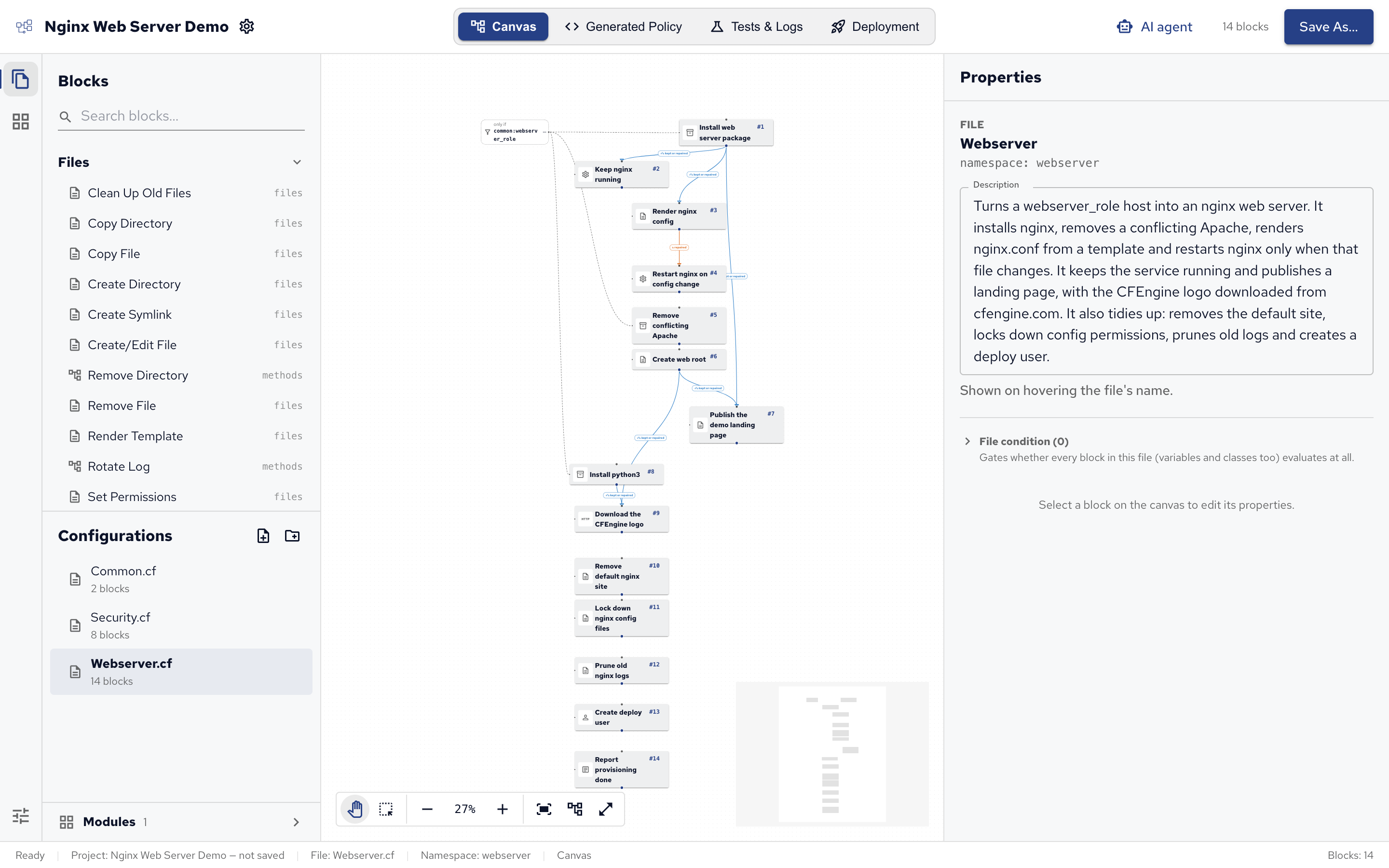
The demo has three configurations, listed under Configurations in the side bar:
| Configuration | Namespace | What it does |
|---|---|---|
| Common.cf | common |
Values and a class the other configurations use. |
| Webserver.cf | webserver |
Installs, configures and runs nginx, and publishes a page. |
| Security.cf | security |
Baseline hardening for every host. |
Each configuration runs its blocks in their numbered order, top to bottom. Below, each one is described block by block.
Common.cf
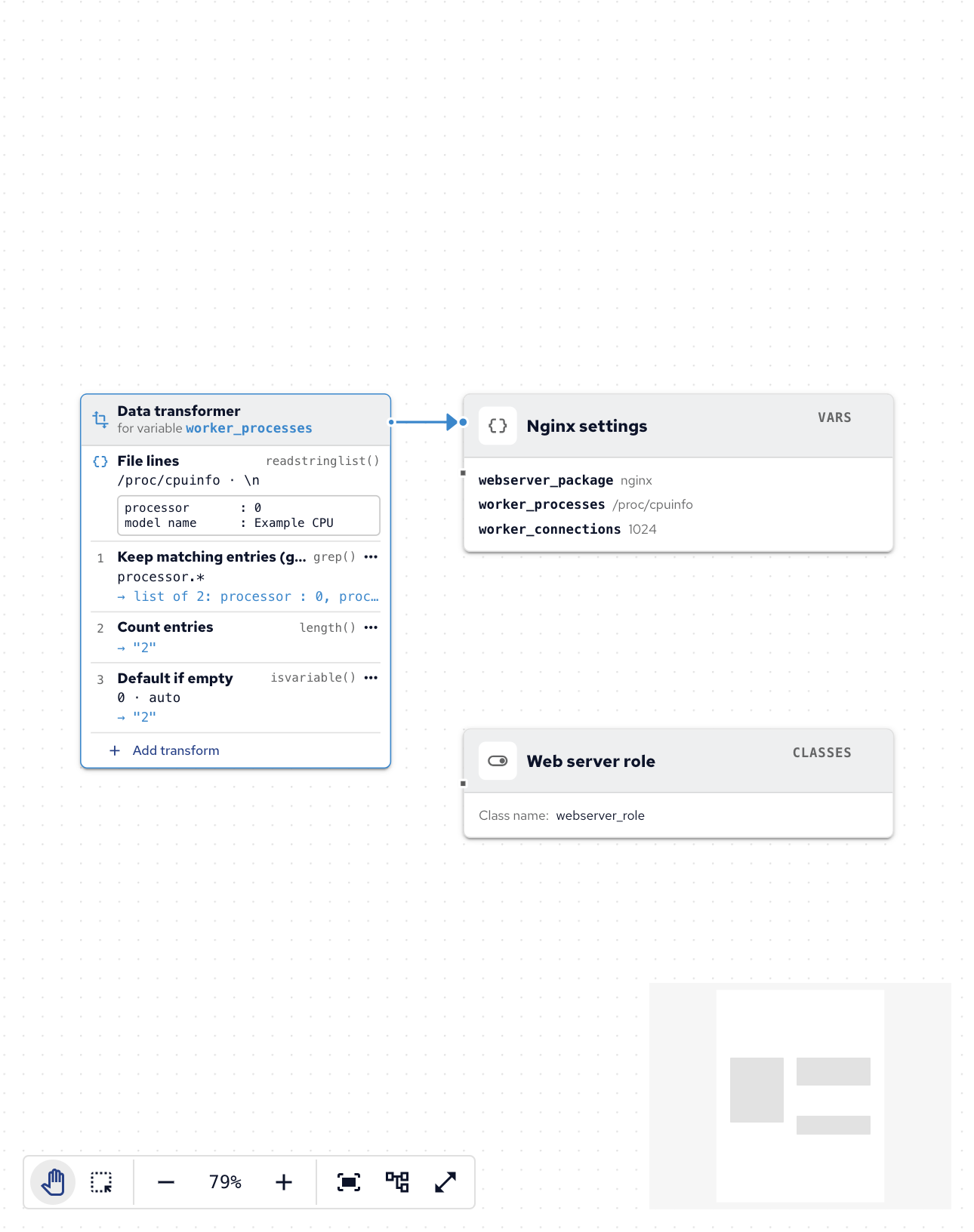
Common.cf holds what the other two configurations share, so it has no arrows: its blocks define values instead of acting on the host.
- Nginx settings (Define Variable) defines three variables:
webserver_package:nginx, the package to install.worker_processes: how many nginx worker processes to start, counted from the host’s CPUs. It reads the lines of/proc/cpuinfo, keeps those matchingprocessor.*, counts them, and falls back toautoif that fails. The card beside the block shows each of these transforms with its result on sample data.worker_connections:1024, the connections each worker accepts.
- Web server role (Define Class) defines the class
webserver_role. Here it’s always true, standing in for a real test of which hosts are web servers; the blocks that set up nginx run only where it’s true.
Webserver.cf uses these as $(common:vars.webserver_package) and common:webserver_role: the namespace common, then the name. See Values and templates.
Webserver.cf
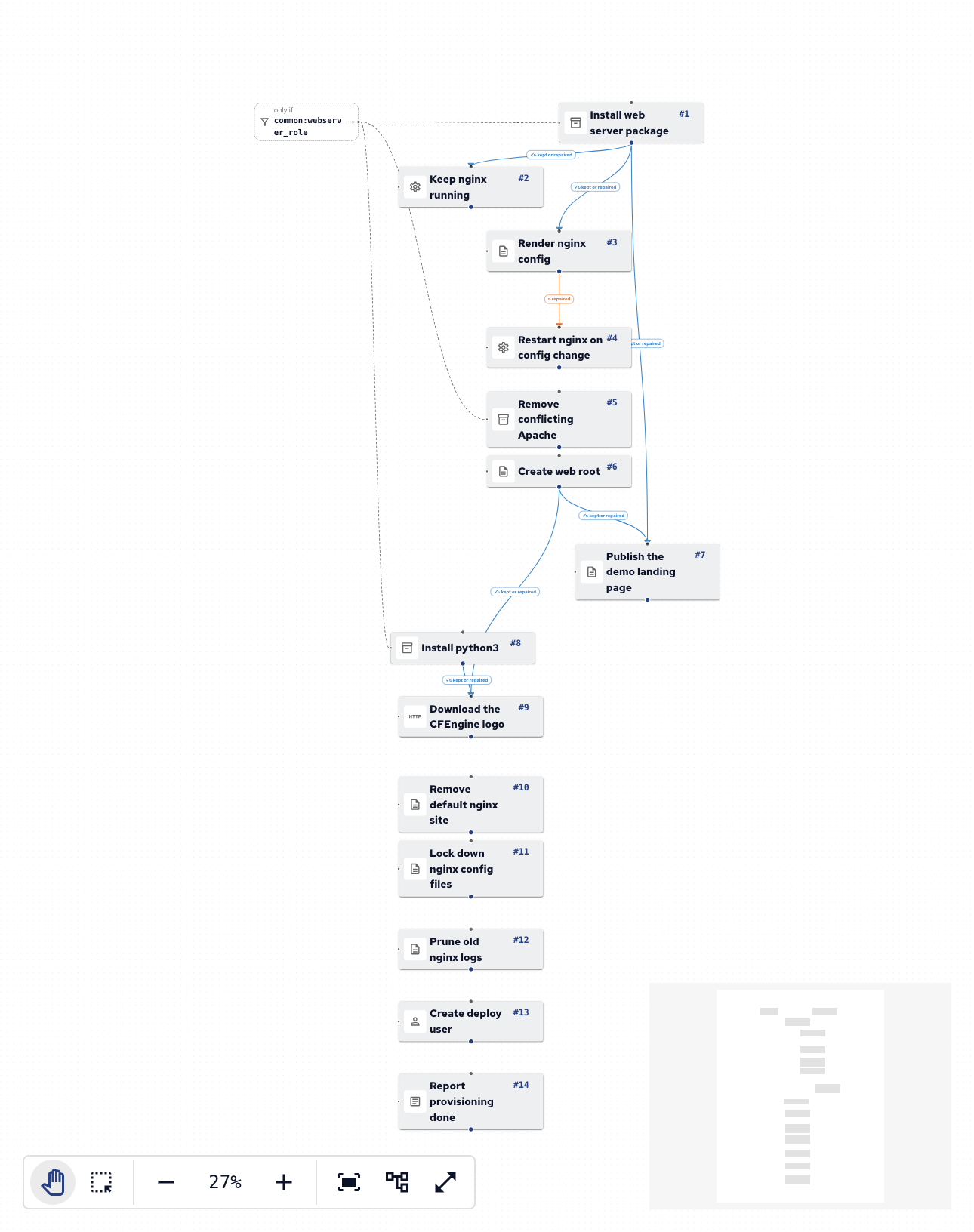
Webserver.cf sets up nginx, in run order:
- Install web server package (Install Package) installs
$(common:vars.webserver_package), only wherecommon:webserver_roleis true. Most of the file waits for it. - Keep nginx running (Manage Service) starts nginx and keeps it running, after the package is installed (arrow: kept or repaired).
- Render nginx config (Render Template) writes
/etc/nginx/nginx.conffrom a template that usesworker_processesandworker_connections, after the package is installed. - Restart nginx on config change (Manage Service) restarts nginx, only when the config file was just rewritten: its arrow from Render nginx config waits for repaired. Without that arrow, nginx would restart on every agent run.
- Remove conflicting Apache (Remove Package) removes
apache2, which would compete for the same port, only on web servers. - Create web root (Create Directory) makes sure
/var/www/htmlexists. - Publish the demo landing page (Render Template) writes
/var/www/html/index.htmlfrom a template, after both the package and the web root (two arrows, kept or repaired). The page shows a Web server role badge on hosts where that class is true. - Install python3 (Install Package) installs Python, which the next block’s module needs, only on web servers.
- Download the CFEngine logo (HTTP Request) downloads the logo for the landing page to
/var/www/html/cfengine-logo.svg, after the web root exists and Python is installed. How often is once a day: the logo doesn’t change, so there’s no need to check every few minutes. Its promise type comes from thepromise-type-httpmodule, which the project lists under Modules. - Remove default nginx site (Remove File) removes
/etc/nginx/sites-enabled/default. - Lock down nginx config files (Set Permissions) keeps
/etc/nginx/nginx.confand/etc/nginx/conf.d/default.confat mode644, owned by root. - Prune old nginx logs (Clean Up Old Files) deletes files in
/var/log/nginxuntouched for 30 days. - Create deploy user (Manage Users) makes sure a
deployuser exists. - Report provisioning done (Report Message) prints
Web server provisioning completein the agent’s output.
Blocks 10 to 14 have no arrows, so they simply run in order, every agent run. See Building policy on the canvas for arrows and conditions.
Security.cf
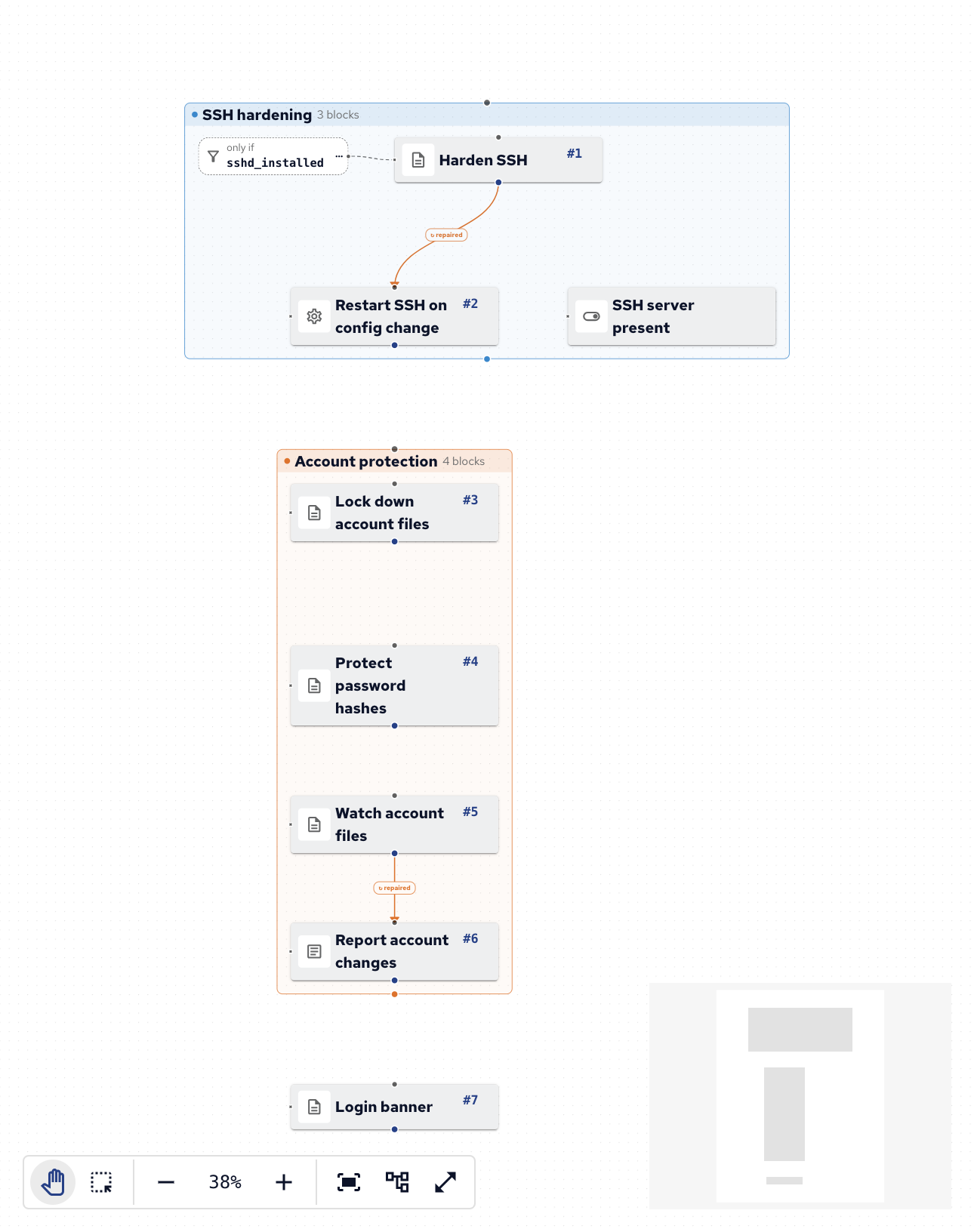
Security.cf hardens every host. It has no file condition, and its blocks are in two groups, each a bundle of its own in the generated policy:
- SSH hardening group:
- SSH server present (Define Class) defines
sshd_installed, true where/etc/ssh/sshd_configexists. - Harden SSH (Set Config Values) sets
PermitRootLogin no,MaxAuthTries 3andX11Forwarding noin/etc/ssh/sshd_config, only wheresshd_installedis true, so hosts without an SSH server are left alone. - Restart SSH on config change (Manage Service) restarts the
sshservice, only when Harden SSH changed the file (arrow: repaired).
- SSH server present (Define Class) defines
- Account protection group:
- Lock down account files (Set Permissions) keeps
/etc/passwdand/etc/groupat mode644, owned by root. - Protect password hashes (Set Permissions) keeps
/etc/shadowat mode640, owned by root and theshadowgroup. - Watch account files (Watch File for Changes) watches
/etc/passwd,/etc/groupand/etc/shadowfor changes. - Report account changes (Report Message) reports
Local accounts changed on $(sys.fqhost), only when Watch account files saw a change (arrow: repaired).
- Lock down account files (Set Permissions) keeps
These settings suit the demo’s Debian and Ubuntu test hosts. On Red Hat-family hosts the SSH service is sshd, and /etc/shadow has no shadow group: it’s owned by root with mode 000.
Login banner (Ensure Lines in File), outside the groups, puts Authorized access only. Activity may be monitored. in /etc/issue.
Reading its policy
Switch to Generated Policy in the top bar to read the CFEngine policy each configuration becomes. Selecting a block highlights its lines. Generated policy explains how to read it.
Testing it
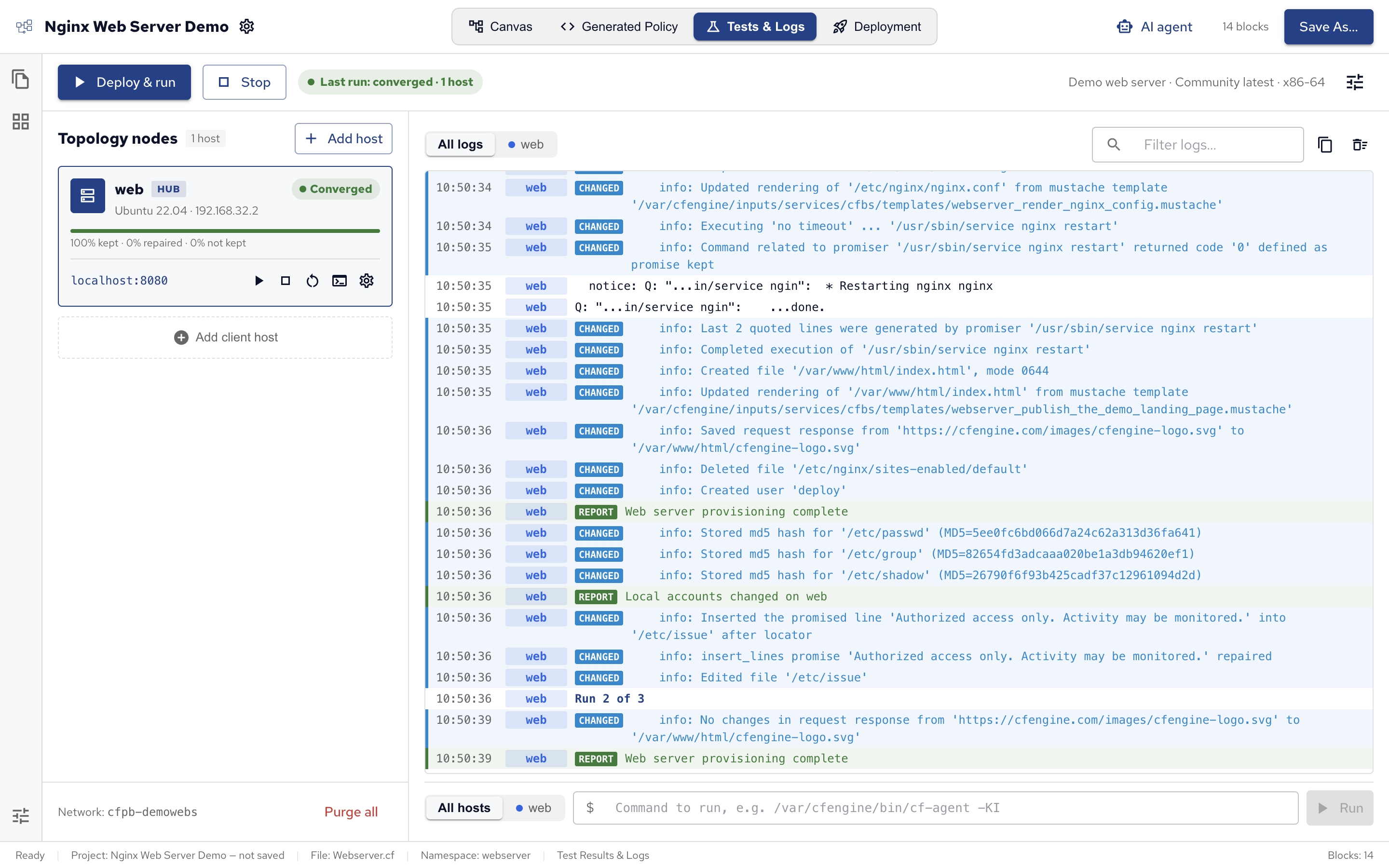
If Docker runs on your computer, open Tests & Logs and click Deploy & run.
The demo comes with a test environment: one Ubuntu host, web, that is also its own hub, with port 8080 published.
The first run takes a few minutes, while Policy Builder downloads the host’s image and CFEngine.
When it finishes, the host shows Converged: every promise was kept.
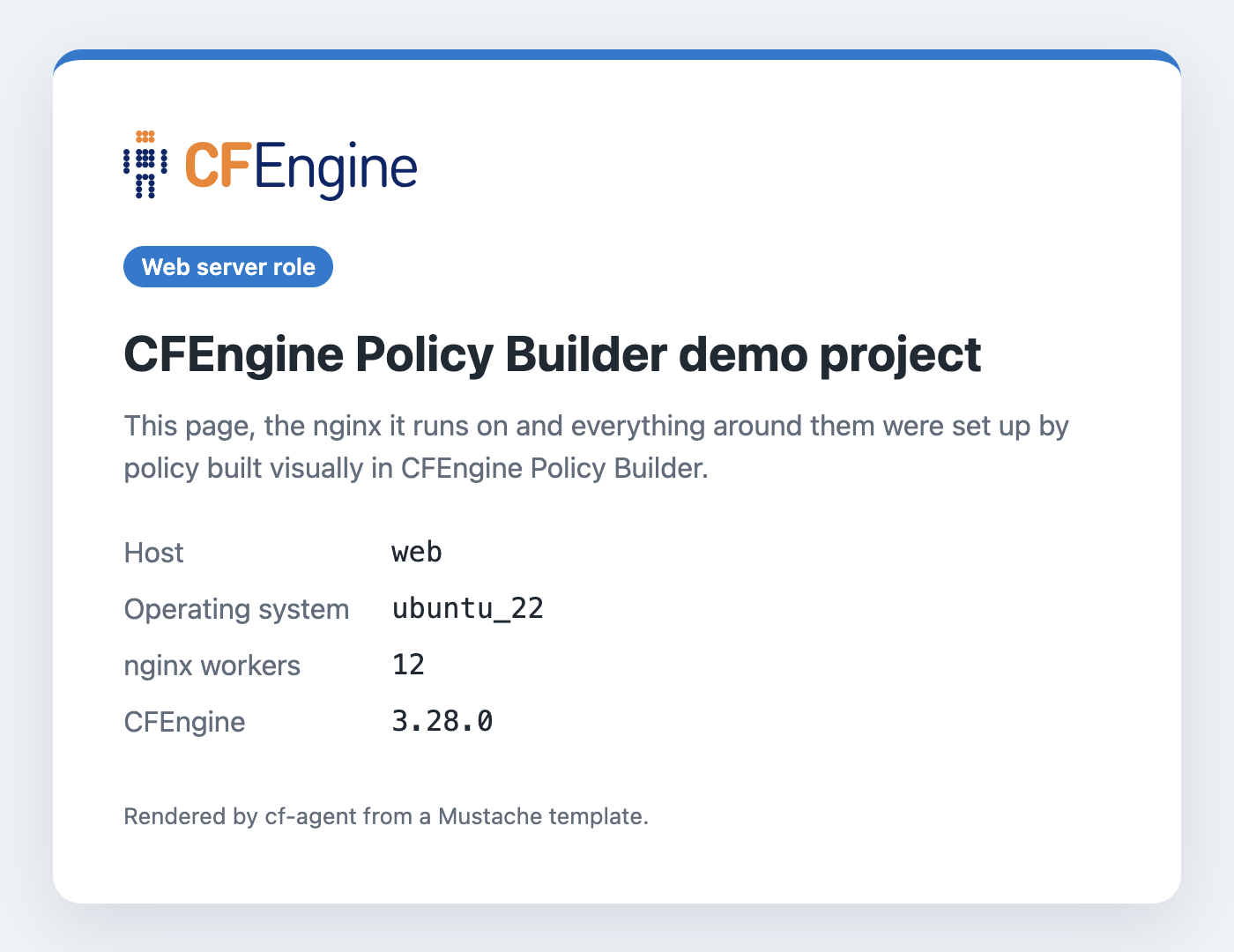
Open http://localhost:8080 to see the landing page the policy published, filled in by its template, with the CFEngine logo it downloaded:
See Test environments.
Seeing what problems look like
The demo is written for Debian and Ubuntu, so a Red Hat-family host shows on purpose what a test with problems looks like. Click Add client host, choose RHEL 8 (AlmaLinux 8), and click Deploy & run again.
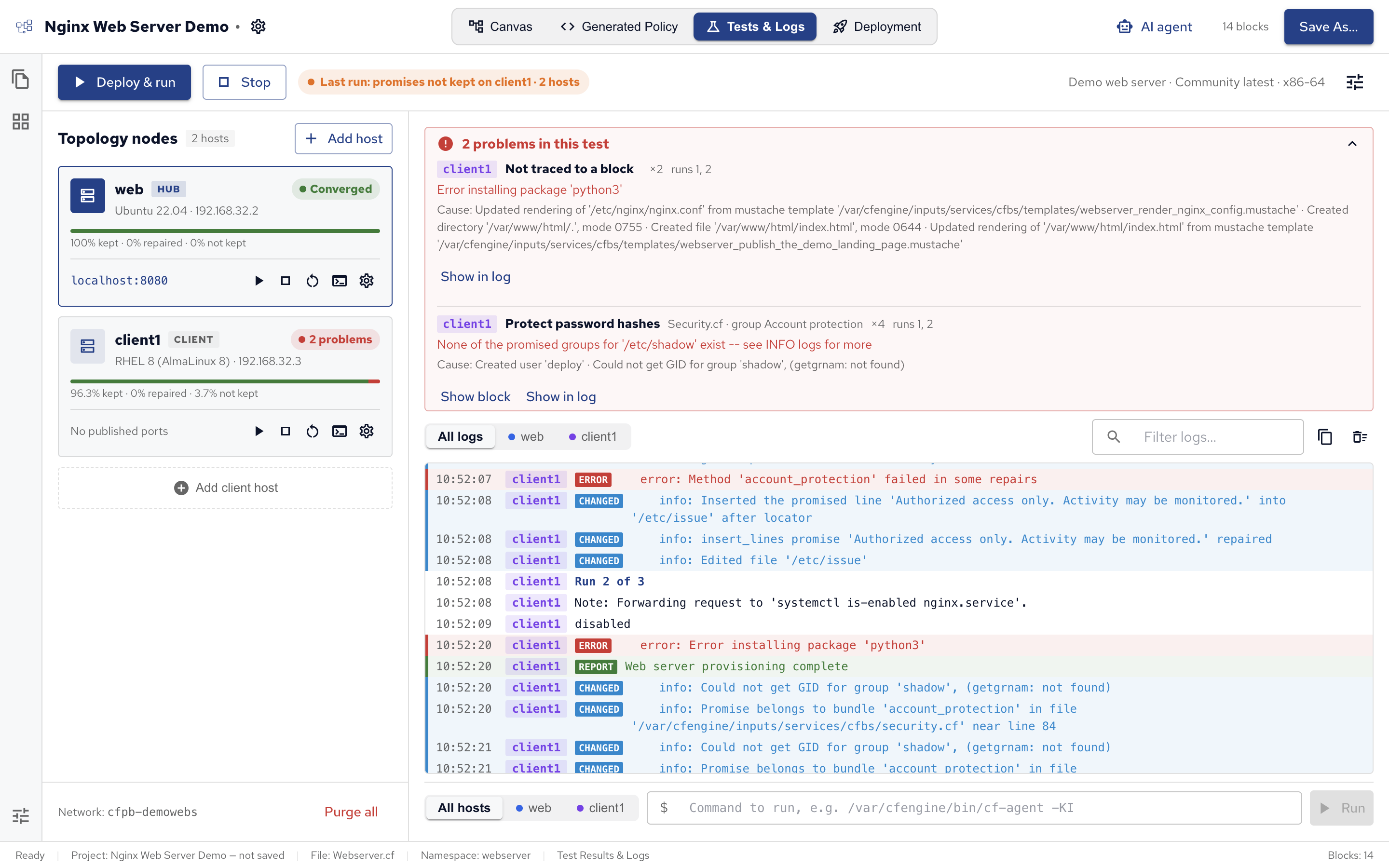
The client shows 2 problems, and the list above the logs explains each one: the error, the block it comes from (or Not traced to a block when the log line doesn’t say), and what the agent did just before it. Show block selects the block on the canvas, and Show in log jumps to the lines in the log.
- Error installing package ‘python3’: on RHEL 8,
python3is only a name the installedpython36package answers to.dnf install python3finds nothing to do, but CFEngine looks for a package called exactlypython3, doesn’t find one, and reports the install as failed. To fix it, install the package by its RHEL 8 name there: in Common.cf, add a variable with the Per condition source,python36wherealmalinux_8holds (the test host’s class for AlmaLinux 8) andpython3otherwise, and use it as Install python3’s package name, as Install nginx uses$(common:vars.webserver_package). - None of the promised groups for ‘/etc/shadow’ exist, from Protect password hashes: RHEL has no
shadowgroup. There/etc/shadowis owned by root, with mode000. To fix it, give the block the conditiondebian, and add a second Set Permissions block with the conditionredhat(true on RHEL and AlmaLinux) and their owner, group and mode.
The same goes for Restart SSH on config change: on RHEL the service is sshd, not ssh.
Saving a copy
To keep the demo, or start your own project from it, click Save As… and choose where to save it. It then works like any other project: see Policy Builder projects.
 Chat
Chat Ask a question on Github
 Mailing list