
Generated policy
Policy Builder writes CFEngine policy from your blocks. You never have to edit it, but reading it shows exactly what your hosts will do, and it’s a good way to learn the policy language.
The Generated Policy view
Open Generated Policy in the top bar (⌘2) to read the open configuration’s policy.
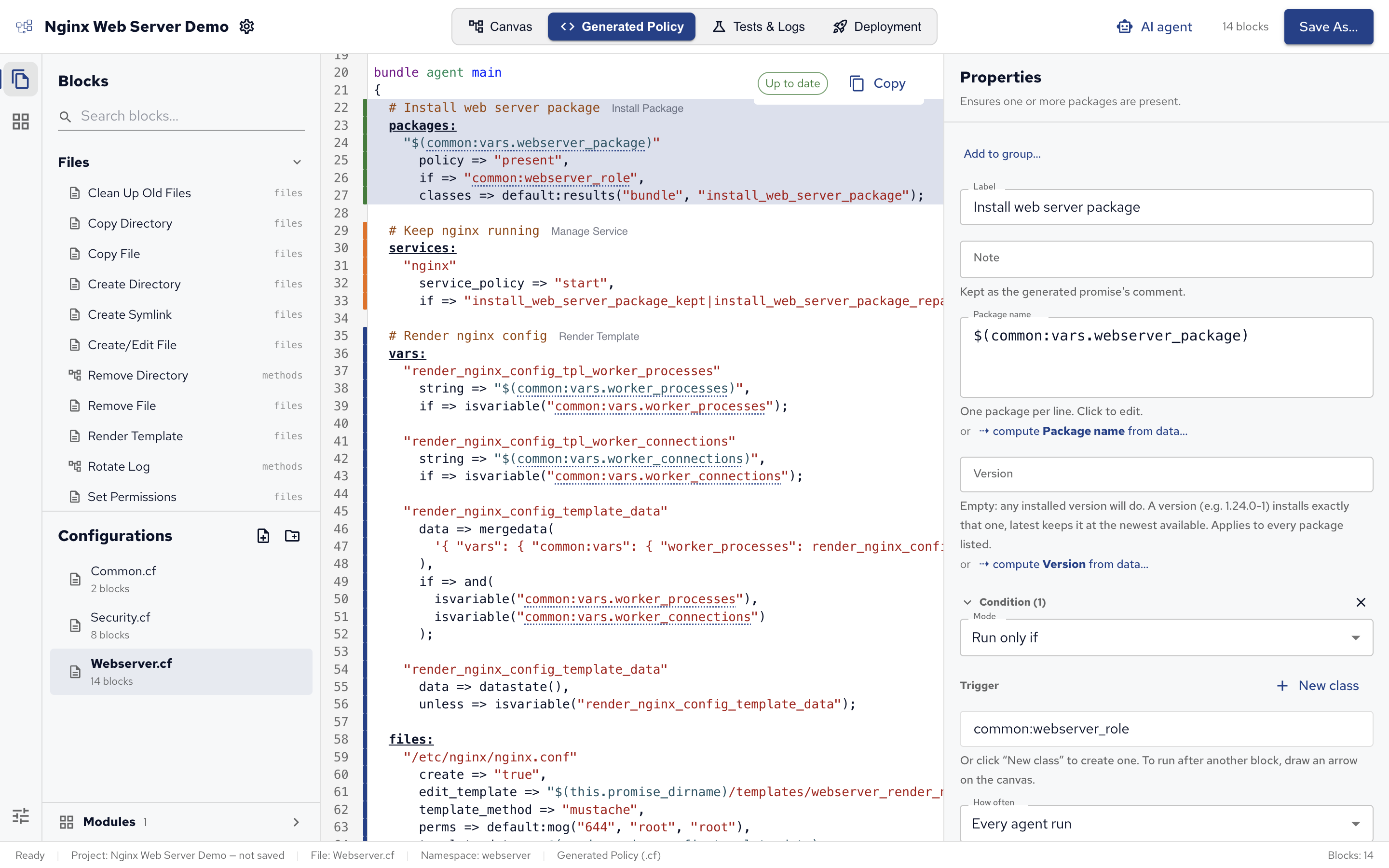
- It follows your edits as you make them, before you save: Up to date shows it matches the canvas, Updating… that it’s catching up.
- The lines of the selected block are highlighted, with the block’s type next to its comment.
- References are links: click
$(common:vars.webserver_package)to jump to where the variable is defined, and press ⌥← to go back. - Copy copies the whole file.
From blocks to policy
Here is part of the demo’s Webserver.cf, as Policy Builder generates it. Each configuration starts with its description and its namespace:
###############################################################################
#
# Turns a webserver_role host into an nginx web server. It installs nginx,
# removes a conflicting Apache, renders nginx.conf from a template and restarts
# nginx only when that file changes. It keeps the service running and publishes
# a landing page, with the CFEngine logo downloaded from cfengine.com. It also
# tidies up: removes the default site, locks down config permissions, prunes
# old logs and creates a deploy user.
#
# Generated by CFEngine Policy Builder from "Webserver".
# Edits here are overwritten when the project is saved.
#
###############################################################################
body file control
{
  namespace => "webserver";
  evaluation_order => "top_down";
}
evaluation_order => "top_down" makes CFEngine run the promises in the order they’re written, which is the canvas’s run order. It’s new in CFEngine 3.27, so hosts need 3.27 or later: older agents refuse the policy (see What you need).
The blocks become promises in the file’s main bundle, each under a comment with its label:
bundle agent main
{
  # Install web server package
  packages:
    "$(common:vars.webserver_package)"
      policy => "present",
      if => "common:webserver_role",
      classes => default:results("bundle", "install_web_server_package");

  # Keep nginx running
  services:
    "nginx"
      service_policy => "start",
      if => "install_web_server_package_kept|install_web_server_package_repaired";
}
Reading it:
packages:andservices:are promise types: what kind of thing the promise is about. The quoted string under them, the promiser, is what the promise is about: the package, the service.if => "common:webserver_role"is the block’s condition: only hosts where the classwebserver_role, defined in Common.cf, is true.classes => default:results("bundle", "install_web_server_package")sets classes from the promise’s outcome:install_web_server_package_kept,_repairedor_not_kept. Policy Builder adds it when an arrow leaves the block.- The arrow to Keep nginx running became its
if: the service is started only after the package promise ended kept or repaired.
Some settings show up as attributes of the promise:
- A note becomes
comment => "…". Promise types from modules don’t take a comment, so there it’s a# Note:line above the promise. - How often becomes
action => default:if_elapsed("1440"), the number of minutes between runs.
Define Variable and Define Class blocks go into a bundle common vars in their configuration, which is why other blocks refer to their variables as $(vars.name), or $(namespace:vars.name) from another file.
A group, a Custom CFEngine block and some blocks that use the standard library become bundles of their own, called from main with a methods: promise in their place.
See Promises, Promise types and Bundles for the language itself.
Files and layout
Each configuration is one .cf file in the project folder, at its place in the Configurations tree.
cfbs.json lists them, with their main bundles, so cfbs build adds them to the policy set and the agent runs each file’s main bundle.
Templates of Render Template blocks go into templates/, shipped with the policy.
Checks
Policy Builder checks the generated policy in two ways:
- The CFEngine linter checks the text of Custom CFEngine blocks as you type.
- cf-promises, CFEngine’s own policy checker, validates the built policy set during the Deployment view’s pre-flight, under Valid policy. See Deploying from Policy Builder.
Problems found while testing, or by a hub that refuses the policy, are traced back to the block that caused them.
 Chat
Chat Ask a question on Github
 Mailing list